By the end of this page, you'll know exactly what Pro adds over the free version, and how to activate it.
Applies to Ultimate Cursor 2.5.0+ and Ultimate Cursor Pro 2.1.0+.
What Pro unlocks
| Capability | Free | Pro |
|---|---|---|
| Cursor types (Text, Image, Icon, Shape, Animated) | ✓ one active configuration | ✓ same, plus multiple configurations |
| All 8 animated effects (Bubble, Splash, Snowflake, Trail, Character, Rainbow, Click Spark, Click Particles) | ✓ ready-made styles; Bubble size and colors | ✓ plus settings for every effect |
| Shapes 1–5 | ✓ | ✓ |
| Shapes 6–25 | — | ✓ |
| Cursor scope: entire website | ✓ | ✓ |
| Cursor scope: specific pages / CSS selectors / HTML elements | — | ✓ |
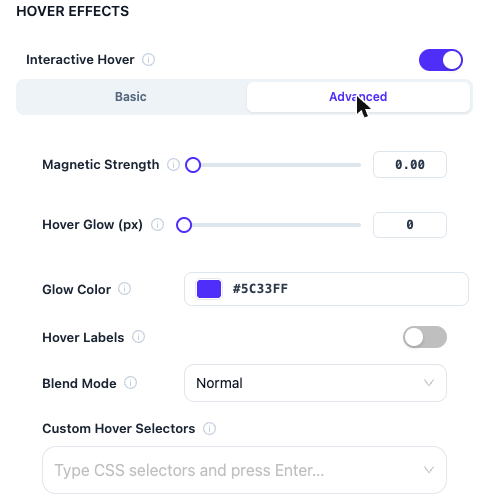
| Interactive Hover (all 10 fields) | — | ✓ |
| Image cursor hotspot alignment | — | ✓ |
| Circular Text cursor and circular background | — | ✓ |
| Multiple cursor configurations | — | ✓ |
| Background: Antigravity, Light Pillar (base effects, color/size/shape settings) | ✓ | ✓ |
| Background display: z-index, opacity, position | — | ✓ |
| Background scope beyond entire-website | — | ✓ |
| Multiple background configurations | — | ✓ |
| Antigravity/Light Pillar advanced motion fields | — | ✓ |
See each linked page in these docs for the full field list per feature — this table is the at-a-glance summary.
How licensing works
Pro checks two things before unlocking anything: the free plugin must be installed and active, and your license (or an active trial) must be valid. There's no enforced minimum free-plugin version — just keep both plugins updated.
If your license lapses, Pro-only settings aren't deleted — they go dormant (hidden from the live site) until the license is active again. See Uninstalling & Data for exactly how that works.
Installing Pro
- Install and activate the free Ultimate Cursor plugin first — Pro requires it.
- Install and activate Ultimate Cursor Pro.
- Activate your license when prompted (redirects to the Freemius activation screen).
- Pro controls appear immediately across the dashboard — no separate settings to configure. The Pro Features page inside the plugin previews each one.
Plans
See the Ultimate Cursor pricing page for current plans and site-count limits — not duplicated here since pricing changes independently of this documentation.