By the end of this page, a cursor effect will apply only inside the specific elements you've chosen, not the whole page.
Applies to Ultimate Cursor Pro 2.0.0+.
CSS-selector scope
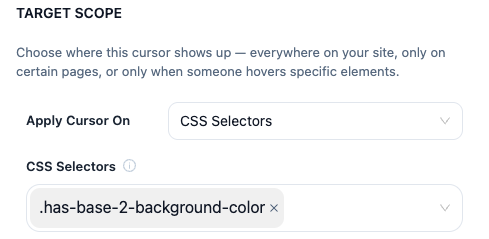
PRO Set scope to css-selectors and list one or more CSS selectors (e.g. .hero-banner, #cta-button). The cursor effect only activates while the pointer is inside a matching element.
HTML-element scope
An alternative to hand-writing CSS selectors: pick elements directly via the html-elements scope option in the admin's element picker, for a more visual selection workflow on complex layouts.
Multi-cursor vs animated-element behavior
How element-scoped cursors render depends on whether multiple cursors are enabled:
- With multiple cursors enabled, an element-scoped cursor layers independently alongside your main page/website cursor.
- Animated effects targeted at an element use a full-viewport container with
clip-pathmasking, so the animation visually stays confined to the element's bounds even though it's technically rendered over the whole page. - With multiple cursors off (legacy single-cursor mode), element scope replaces rather than layers with the main cursor while hovering that element.