By the end of this page, you'll know which click/particle effect fits your site and how to configure its fields.
Applies to Ultimate Cursor 2.5.0+ and Ultimate Cursor Pro 2.1.0+.
Overview
All four effects below are free and run with a ready-made style. Choose Animated under General Settings → Select Cursor Type, then pick one of these as the effect. The fields listed for each effect are PRO settings for restyling it.
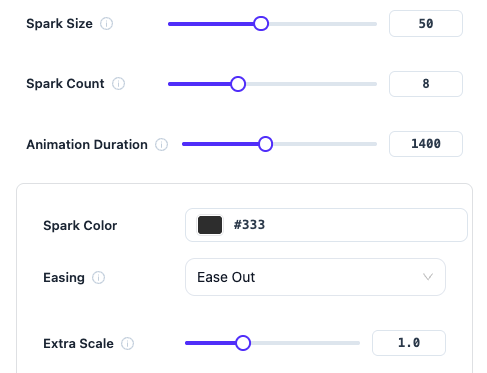
Click Spark
A burst of small lines radiates outward from each click point.
| Field | Type | Default |
|---|---|---|
sparkColor | color | #333 |
sparkSize | number | 50 |
sparkRadius | number | 15 |
sparkCount | number | 8 |
duration | number (ms) | 1400 |
easing | enum | ease-out |
extraScale | number | 1.0 |
Click Particles
A burst of small particles scatters from each click point.
| Field | Type |
|---|---|
particleColor | color |
particleSpeed | number |
Trail Cursor
An emoji trails behind the pointer as it moves.
| Field | Type | Default |
|---|---|---|
trailEmoji | text | ✨ |
trailEmojiSize | number | 16 |
trailParticleCount | number | 15 |
trailSpeed | number | 0.4 |
trailOpacity | number | 1 |
Splash Cursor
A fluid-style splash ripples outward from the pointer.
| Field | Type | Default |
|---|---|---|
splashRadius | number | 0.5 |
splashForce | number | 6000 |
splashColors | color list | [#e6f1f7] |