By the end of this page, you'll have a moving cursor effect running on your site, and know which animated effects are free versus Pro.
Applies to Ultimate Cursor 2.5.0+.
What "Animated" means
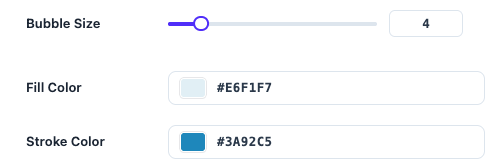
Choosing the Animated card under General Settings → Select Cursor Type opens a second choice: which animated effect to run. Ultimate Cursor ships 8 effects — Bubble, Splash, Snowflake, Trail, Character, Rainbow, Click Spark and Click Particles — and all 8 are free, each with a ready-made style. On the free plan you can also change Bubble's size and colors; Pro adds the settings to restyle every other effect.
All animated effects respect your system's reduced-motion preference automatically — see Accessibility & Reduced Motion.
Bubble Cursor (free)
A soft circular bubble follows the pointer with a trailing motion.
| Field | Type | Default |
|---|---|---|
bubbleSize | number | 4 |
bubbleFillColor | color | #e6f1f7 |
bubbleStrokeColor | color | #3a92c5 |
- Choose Animated under Select Cursor Type.
- Pick Bubble Cursor as the effect.
- Set size and colors under Customize Your Cursor → Style.
- Save Changes and check the live preview.
Snowflake and Rainbow
Snowflake scatters falling emoji particles (default ❄️) across the viewport. Rainbow Cursor trails a multi-color gradient behind the pointer. Both run free with their default style. PRO adds count, size and lifespan controls for Snowflake, and the color list, length, blur and trail speed for Rainbow.
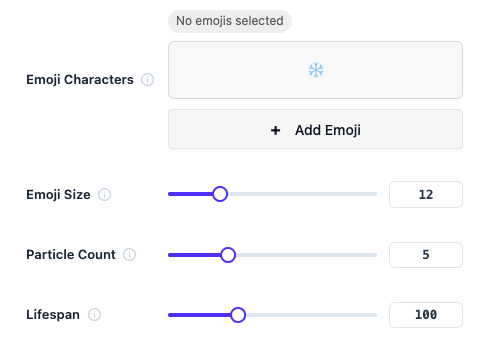
Full field-by-field reference for every effect's Pro settings (including these two) lives in Advanced Animations Reference so you don't have to cross-check two pages while tuning a live effect.
Choosing an effect
Only one effect runs per configuration. If you want click-triggered effects (sparks, particle bursts) instead of a continuously-visible follower, see Particle Effects — those are also under the Animated type but are click-driven rather than always-on.