By the end of this page, the Antigravity floating-particle background will be running, tuned to your color and density preference.
Applies to Ultimate Cursor 2.3.1+.
What it looks like
Antigravity renders floating particles that drift slowly across the page, like dust or embers. Choose it as the type on Ultimate Cursor → Background.
Free fields
| Field | Type | Default |
|---|---|---|
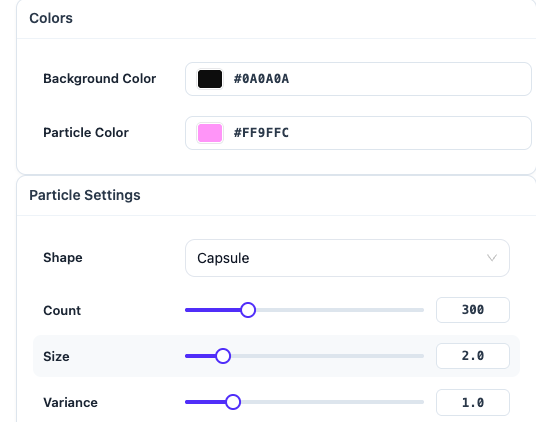
particleColor | color | #FF9FFC |
particleCount | number | 300 |
particleSize | number | 2 |
particleShape | enum | capsule (also: sphere, box, tetrahedron) |
particleVariance | number | 1 |
Pro fields
PRO These control the particles' motion behavior — magnetism, waviness, rotation, and pulsing:
| Field | Notes |
|---|---|
magnetRadius | radius particles are pulled toward the cursor |
ringRadius | ring formation radius |
waveSpeed / waveAmplitude | wave motion speed and height |
lerpSpeed | how quickly particles ease toward their target position |
autoAnimate | animate without cursor interaction |
rotationSpeed | particle self-rotation |
depthFactor | simulated depth/parallax |
pulseSpeed | pulsing size animation |
fieldStrength | overall force strength |
On the free plan these stay at safe defaults so the effect still looks intentional — nothing breaks, you just can't fine-tune the motion.
Save & preview
Save, then watch the live preview and the frontend — particle count above a few hundred can affect performance on lower-end devices; see Performance & Asset Loading if you notice lag.