By the end of this page, a glowing Light Pillar background effect will be running with your chosen colors.
Applies to Ultimate Cursor 2.3.1+.
What it looks like
Light Pillar renders a glowing vertical light effect across the page — a soft, ambient look distinct from Antigravity's particle field. Choose it as the type on Ultimate Cursor → Background.
Free fields
| Field | Type | Default |
|---|---|---|
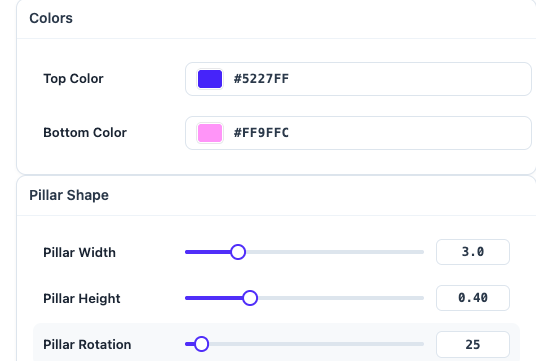
topColor | color | #5227FF |
bottomColor | color | #FF9FFC |
pillarWidth | number | 3 |
pillarHeight | number | 0.4 |
pillarRotation | number | 25 |
Pro fields
PRO
| Field | Type | Notes |
|---|---|---|
intensity | number | overall brightness |
rotationSpeed | number | animated rotation speed |
glowAmount | number | glow spread |
noiseIntensity | number | grain/noise texture amount |
interactive | bool | react to pointer position |
mixBlendMode | enum | screen, normal, lighten, plus-lighter |
quality | enum | low, medium, high |
Lowering quality on lower-end target devices is a Pro-only performance lever — on free, quality stays fixed at a safe default.
Save & preview
Save, check the live preview and frontend. If the effect looks too subtle or too intense, adjust topColor/bottomColor contrast before reaching for Pro's intensity control.